Invoicing & payments · Get paid
Invoice in minutes. Get paid online, with zero platform fees.
Create invoices from tracked time, expenses, quotes or deals, send them with a branded payment page, and let reminders chase late payers for you. Payments go straight to your Stripe, PayPal or bank account.
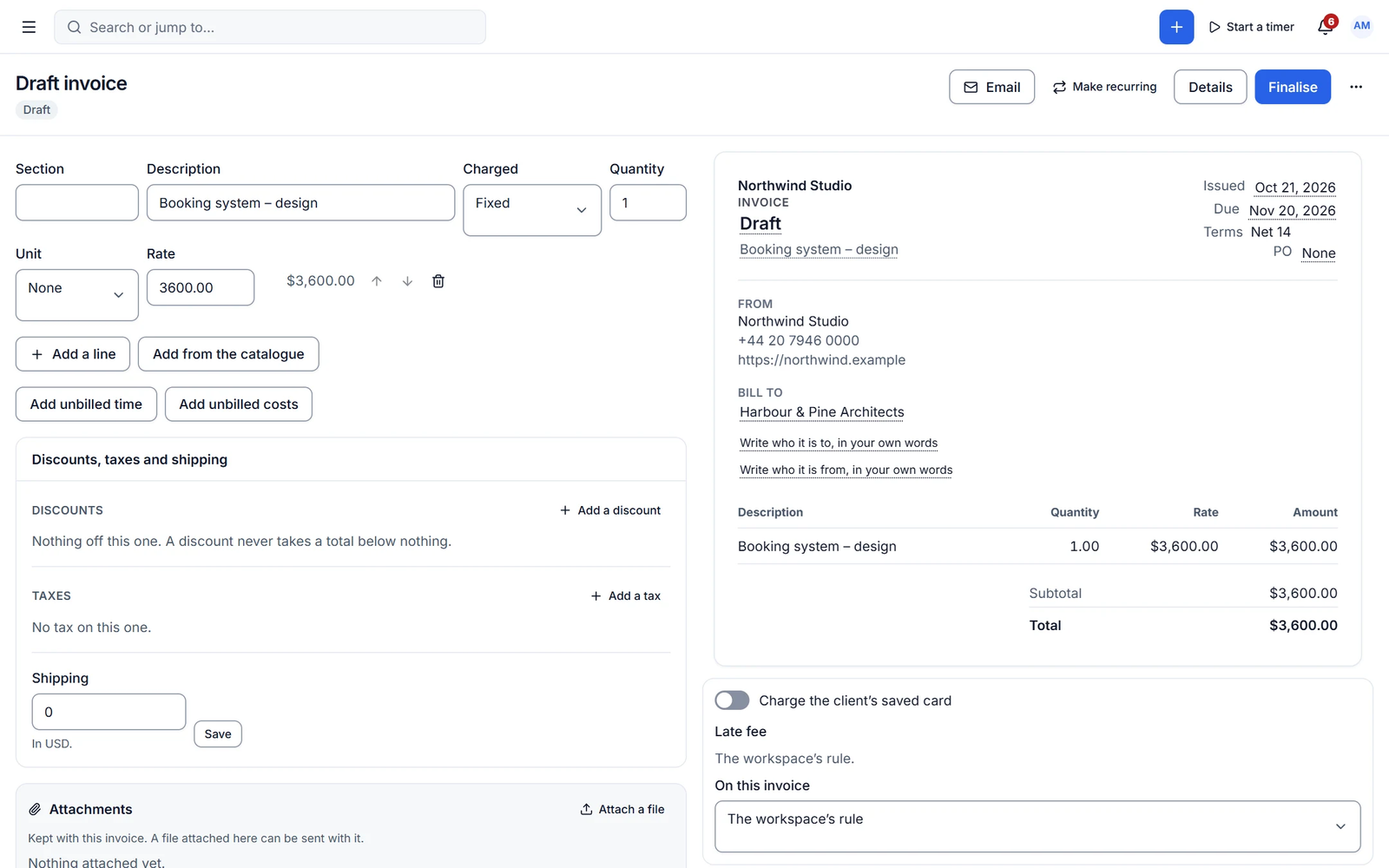
Chasing payments eats the time you should be billing
Copying hours into a spreadsheet, building the invoice, then sending three awkward reminders. Cliezoo builds the invoice from work you already logged and follows up on schedule.
Invoices
A live, branded editor
Two-pane editor with live preview, fixed, hourly and quantity lines, sections, multiple discounts and taxes, shipping, partial payments, attachments and every built-in layout. Numbering supports date tokens and yearly resets.
- Create from time, expenses, quotes, deals or templates
- Credit notes, refunds and dispute tracking
- Multi-currency invoicing
Get paid
Online payments and reminders that work for you
Accept cards, Apple Pay and Google Pay through Stripe, plus PayPal, Razorpay and unlimited manual methods such as bank transfer or Wise. Reminder schedules have any number of steps and stop as soon as the invoice is paid.
- Connect Stripe with your own API keys
- Clients report manual payments with "I've paid"
- Payment records with fees and net amounts
Capabilities
What you get with invoicing & payments
Free features work with no limits. Pro features are marked.
-
Zero platform fees
Cliezoo never takes a cut of your payments.
-
Flexible reminder schedules
Any number of steps and offsets, per client or per invoice.
-
Unlimited manual methods
Bank transfer, Wise, mobile wallets, cheque or cash with instructions and QR.
-
Catalogue and tax library
Products, prices per currency, compound and inclusive taxes.
- Pro
Recurring invoices
Any schedule, draft or auto-send, with pause, skip and history.
- Pro
Retainers and payment plans
Prepaid hours or money with drawdown, plus instalments and late fees.
- Pro
Accounting sync
QuickBooks, Xero, FreshBooks, FreeAgent, Zoho Books and Sage.
- Pro ✦ AI
AI invoicing
Drafting, line descriptions, error checks and late-payment prediction.
-
Multi-currency invoicing
Invoice each client in any ISO currency, with prices per currency in the catalogue.
-
Credit notes, refunds and disputes
Credit notes with their own series, gateway refunds and dispute tracking.
-
Invoice templates
Save any invoice as a template with its items, instructions and header.
- Free + Pro
Failed-payment handling
Team and client are told when a payment fails. Pro retries automatically on a schedule.
- Pro
Exchange-rate reporting
See revenue across currencies in your base currency.
✦ AI in invoicing & payments
Know which invoices will be late
Pro drafts invoices and line descriptions, checks for errors before you send, writes reminder copy and predicts which invoices are likely to be paid late.
- Error check before sending
- Reminder copy
- Late-payment prediction
With Cliezoo Pro Pro
More automation and scale
- Recurring invoices
- Retainers, payment plans and late fees
- More gateways: Square, Authorize.net, Braintree, Mollie and regional packs
- Accounting sync
- Custom invoice layout designer
- AI drafting and late-payment prediction
Frequently asked questions
Can’t find your answer? Read the docs or ask the Degird team.
Read the docs → Contact us →Does Cliezoo take a fee on payments?
No. There are zero platform fees in Free and Pro. You only pay your payment processor’s normal fees.
Which payment methods are included for free?
Stripe (cards, Apple Pay, Google Pay, Link), PayPal, Razorpay and unlimited manual methods such as bank transfer.
Can I invoice tracked time?
Yes. Add unbilled time and expenses to any invoice, grouped by task, person, service or date. Invoiced entries are locked.
Run your whole client business from WordPress.
Install the free plugin in minutes. No caps, no trial, no credit card. Upgrade to Pro when you want autopilot.